Checking your First Abu Dhabi Bank (FAB) balance is now faster and more secure in 2026. Whether you are a salary account holder, a Ratibi card user, or a credit card customer, this guide provides the exact steps, SMS codes, and official links to manage your finances.
Table of Contents
Quick FAB Balance Inquiry Guide (At a Glance)
| Method | Requirement | Official Detail |
| FAB Mobile App | App + Registered Mobile | Download App |
| SMS Banking | Registered Number | SMS BAL to 2121 |
| FAB Ratibi Card | Card ID + Last 2 Digits | Direct Portal Link |
| Customer Care | Phone Call | 600 52 5500 (Inside UAE) |
1. Check FAB Balance Online (Without Login)
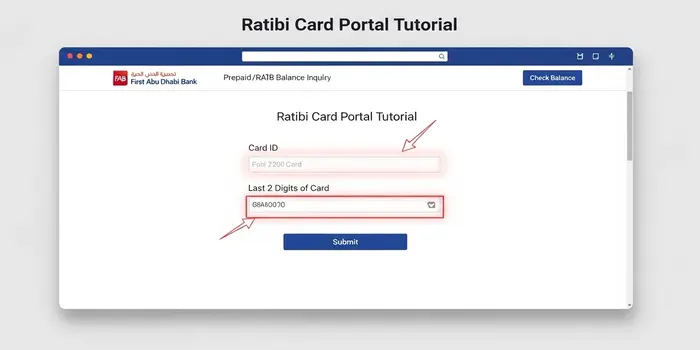
For Ratibi and Prepaid Card users, you don’t need to log in to the full portal. This is a top-searched method in the UAE.
- Step 1: Visit the FAB Prepaid Portal.
- Step 2: Enter the Last 2 digits of your card.
- Step 3: Enter your Card ID (found on the front of the card).
- Step 4: Click “Go” to see your available balance instantly.
2. FAB Mobile App (Smart Features 2026)
The updated FAB Mobile App now uses biometric security.
- Login via Face ID or Fingerprint.
- View Available Balance vs Current Balance on the dashboard.
- New Feature: Access “Spending Insights” to see where your money goes.
- Pro Tip: Use the app to recharge your Nol Card or pay RTA fines directly.
3. Check FAB Balance via SMS (No Internet Required)
If you are traveling or don’t have data, SMS banking is the most reliable method.
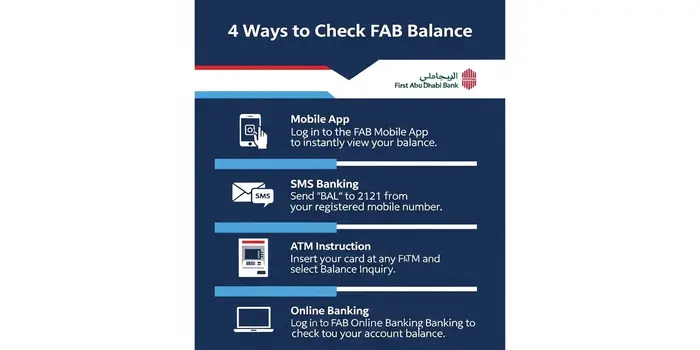
- Process: Send the keyword BAL to 2121 from your registered mobile number.
- Response: You will receive a secure SMS with your primary account balance and the last 3 transactions.
- Cost: Standard SMS rates apply.
4. FAB Balance Check via ATM
With over 400+ ATMs in the UAE, you can check your balance anywhere.
- Insert your FAB Debit/Credit card.
- Enter your 4-digit PIN securely.
- Select “Balance Inquiry” from the main menu.
- Choose whether you want a printed receipt (Mini-Statement) or a screen view.
5. FAB Customer Service (24/7 Helpline)
If you face any issues or your app is locked, contact the official FAB support:
- UAE (Toll-Free): 600 52 5500
- International: +971 2 681 1511
- Ratibi Specific Support: 600 52 2298
6. Troubleshooting Common Balance Issues
- Ledger vs. Available Balance: Available balance is what you can spend after pending transactions (like hotel holds or fuel station blocks).
- App System Maintenance: FAB often updates its servers on Friday nights (UAE time). If the app fails, use the SMS method.
- Account Blocked? If you haven’t updated your Emirates ID details, your account might be frozen. Update it via the FAB app to resume services.
FAQs for FAB Balance Check
How can I check my FAB Ratibi card balance without a mobile app?
You can check your Ratibi balance without the app by visiting the official FAB Prepaid Card Portal (PPC). Simply enter your Card ID and the last two digits of your card. Alternatively, you can use any FAB ATM or call the Ratibi helpline at 600 52 2298.
What is the SMS code to check FAB account balance?
To check your balance via SMS, send the keyword BAL followed by a space and the last four digits of your account number (e.g., BAL 1234) to 2121 from your registered mobile number.
Why is my FAB available balance different from my ledger balance?
The Available Balance is the amount you can spend right now. The Ledger Balance includes the total money in your account, including “Pending Transactions” (like hotel holds, fuel station authorizations, or recent cheque deposits) that haven’t been fully processed yet.
Can I check my FAB balance if my Emirates ID is expired?
If your Emirates ID is expired, FAB may temporarily freeze your account for security reasons, which might prevent balance updates. You should update your EID details through the FAB Mobile App or a branch to restore full access to your account information.
How do I find my FAB IBAN number for transfers?
You can find your IBAN instantly through the FAB Mobile App on the account dashboard or by using the IBAN Generator on the FAB official website. It is also printed on your bank statement.
Is there a charge for checking FAB balance at a non-FAB ATM?
Within the UAE, checking your balance at a non-FAB ATM (via the UAE Switch network) may incur a small fee of AED 1 to AED 2, depending on the bank. Checking at an official FAB ATM is always free.

Hi! We’re the Travel Blog Dubai Team — passionate travelers who explore Dubai every day to bring you honest tips, best places to visit, budget ideas, and real experiences.Whether you’re planning your first trip or you live in the UAE, our guides help you discover the best of Dubai, hassle-free.