
Missing your bill deadline or standing in long queues at payment centers is now a thing of the past. For Etisalat (now rebranded as e&) users in the UAE, the Quick Pay service offers a seamless way to settle bills or recharge accounts in under 2 minutes—no login or password required.
Whether you need to handle a personal Etisalat quick pay recharge or manage complex Etisalat business quick pay accounts for your company, the process is now fully digitized. From the busy streets of Dubai to the comfort of your home, Quick Pay e& is accessible 24/7. This 2026 guide provides the exact official links and steps to pay your bill safely and instantly.
Table of Contents
How e& (Etisalat) Bill Payment Works in 2026
Paying your bills in the UAE is now as simple as ordering a taxi. Etisalat has streamlined its system so you can choose the method that fits your lifestyle. Whether you are commuting on the Dubai Metro Red Line or sitting in an office, you can settle your dues in seconds.
You can opt for Etisalat Quick Pay online for instant results, visit a physical Business Center if you prefer cash, or set up Autopay to handle everything automatically. For corporate users, the Etisalat B2B Quick Pay portal is specifically designed to manage multiple employee lines under one company profile. Once you select your preferred method, managing your telecom expenses becomes effortless.
Effortless Online Payment Options
Using your smartphone is the most efficient way to pay. There is no need to drive through traffic or wait for a physical receipt. You can complete your e& Quick Pay transaction from anywhere with an internet connection.

1. The Quick Pay Portal (No Login)
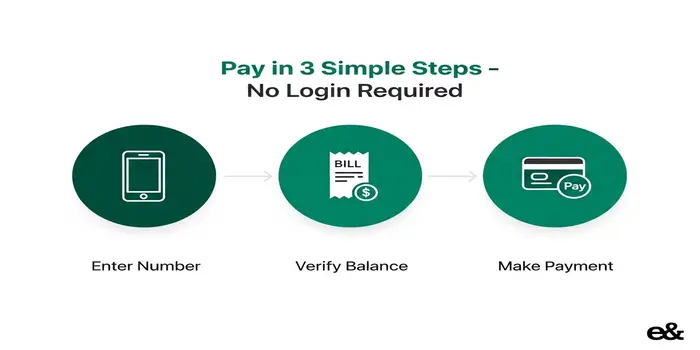
This is the fastest method for both prepaid recharges and postpaid bills. You don’t need to remember any usernames or passwords.
- Step 1: Visit the official e& website.
- Step 2: Enter your account or mobile number.
- Step 3: Use Apple Pay or a credit card to finish.
2. My Etisalat (e&) App
For users who want more control, the app allows you to track data usage and manage family lines in one place. It’s as essential for residents as having a Hafilat Card for Abu Dhabi transport.
3. Business and B2B Payments
If you are managing corporate expenses, use Etisalat Business Quick Pay. You can access the B2B login to view detailed invoices and handle mass recharges for your team efficiently.
Autopay: The “Set and Forget” Solution
If you want to eliminate the stress of monthly deadlines, setting up Autopay via the My Etisalat (e&) app is the best strategy. By linking your credit card once, your bill is automatically settled every month. This prevents late fees and ensures your service is never disconnected—even if you are traveling abroad.
This feature is available for both Etisalat personal accounts and Etisalat business users. Before setting this up, it is a smart idea to check your FAB bank balance or your primary bank account to ensure you have sufficient funds for the transaction. Autopay is perfect for busy professionals who want to automate their utility payments.
Offline Payment: Cash, Kiosks, and Business Centers
While online methods are faster, many people still prefer paying with cash or receiving a physical receipt. You can visit any Etisalat (e&) Business Center across the UAE to settle your bill in person. If you are taking a Dubai Taxi to a nearby mall, you will likely find Etisalat Payment Machines (Kiosks) available near the entrance or hypermarket sections.
These kiosks are available 24/7 and are ideal for:
- Cash Payments: For those who don’t want to use cards online.
- Quick Recharges: Instantly top up any prepaid number.
- Business Payments: Settle Etisalat B2B quick pay bills using cash or cards at the machine.
Additionally, authorized grocery stores and exchange houses like Al Ansari Exchange accept Etisalat UAE bill payments. Simply provide your account number, pay the amount, and keep your printed receipt for your records.
Paying via e& (Etisalat) Phone Banking
If you are on the road or don’t have immediate access to the internet, you can pay your bill via phone. By calling the official e& Customer Service (101), you can use the Interactive Voice Response (IVR) system to settle your dues securely.
This is a great alternative if the e& Quick Pay portal is under maintenance. Simply follow the automated voice prompts and enter your card details. It’s as straightforward as checking your bank balance—safe, guided, and instant.
Using International Cards for e& Payments
If you are a tourist or a new resident using a foreign credit card for Etisalat Quick Pay, keep a few things in mind:
- Transaction Fees: Your home bank may charge a 2-3% foreign transaction fee for UAE-based payments.
- Security Blocks: Some banks flag utility payments in the UAE as suspicious. It is wise to notify your bank before attempting a large Etisalat postpaid quick pay transaction.
While Visa and Mastercard are widely accepted, make sure your card is enabled for 3D Secure (OTP). If you’re a new resident and don’t have a local card yet, you might find our guide on FAB bank balance and accounts helpful for setting up your first UAE bank account.
Security Alert: How to Avoid e& Payment Scams
In the UAE, scammers often target residents with fake “discounts” or “urgent disconnection” notices. To ensure your Etisalat Quick Pay experience is safe, follow these rules:
- Check the URL: Only use official domains like etisalat.ae or eand.ae.
- Protect Your Data: Official e& Business Quick Pay representatives will never ask for your 3-digit CVV or your One-Time Password (OTP).
For the most secure experience, we recommend using the official e& app to manage your bills and recharge your mobile card balance directly from your smartphone.
Pro Tips for Managing Your e& (Etisalat) Bills
To ensure your mobile and internet services remain uninterrupted, keep these smart tips in mind:
Verify Payments: If you are unsure if a payment went through, check your bank balance to see if the amount was debited before trying again.
Save Confirmation Receipts: Always take a screenshot or save the PDF receipt after using Etisalat Quick Pay.
Set Reminders: If you don’t use Autopay, set a calendar alert 3 days before your bill due date.
Monitor Usage: Use the My Etisalat (e&) app to track your data consumption so you aren’t surprised by high bills.
Conclusion
Paying your Etisalat (e&) bill in the UAE has never been more convenient. Whether you prefer the instant e& Quick Pay portal, the feature-rich mobile app, or visiting a physical business center, you have multiple secure options at your fingertips.
By choosing the method that suits your schedule—be it a one-time guest payment or automated monthly transfers—you can stay connected without the stress of late fees. For more guides on managing your digital life in the Emirates, including checking your card balances online, stay tuned to our latest updates.
Frequently Asked Questions
Can I pay my Etisalat bill without an account or login?
es, you can! The Etisalat (e&) Quick Pay service allows you to pay your postpaid bills or recharge your prepaid account without any registration. Simply enter your mobile number or Account ID on the official portal and proceed with your payment.
What is the difference between Etisalat Personal and Business Quick Pay?
Personal Quick Pay is for individual mobile and home internet users. Etisalat Business Quick Pay (B2B) is specifically designed for corporate clients to manage and pay for multiple employee lines or office services using a single corporate Account ID.
Does Etisalat Quick Pay support Apple Pay and Google Pay?
Yes. As of 2026, the e& (Etisalat) portal and the My Etisalat app fully support Apple Pay, Google Pay, and all major UAE credit/debit cards (including FAB, ADCB, and Emirates NBD).
What should I do if I don’t receive a payment confirmation?
First, check your SMS and registered email for a digital receipt. If you haven’t received it, we recommend you check your bank balance
to see if the amount was debited. If the money was taken but the bill is still unpaid, call 101 for immediate assistance.
Can I pay my Etisalat bill using an international credit card?
Yes, Etisalat accepts international Visa and Mastercard. However, please be aware that your home bank may charge foreign transaction fees, and your card must be enabled for 3D Secure (OTP) to complete the payment safely.
Is there a fee for using the Etisalat Quick Pay service?
No, using the official Etisalat Quick Pay portal or the My Etisalat app is completely free. Always ensure you are using the official websites to avoid third-party service charges or scams.

Hi! We’re the Travel Blog Dubai Team — passionate travelers who explore Dubai every day to bring you honest tips, best places to visit, budget ideas, and real experiences.Whether you’re planning your first trip or you live in the UAE, our guides help you discover the best of Dubai, hassle-free.